When WordPress is enough
You already pay for WordPress hosting. The blog ranks, the plugins are installed, and every tutorial you open treats Elementor as the editor for the offer. The question is whether that editor is enough for the lander, or whether you will still buy a second tool the week you turn on ads.
Compare the WordPress picks if you want the page, the checkout and the test side by side before you buy.
It is a real page builder, and the company sells it for offer pages as well as whole sites. Elementor's homepage lists landing pages, blogs, membership sites, portfolios and online stores as the work the editor is built for. The same page says the plugin powers over 22 million sites and 13% of the web. That scale is the vendor's own claim, and it is why the editor shows up as the default.
The decision comes down to which of those three jobs you need. This plugin builds the page inside WordPress. A WooCommerce funnel plugin owns the path after the click. A hosted builder owns a test that keeps one ad URL. The WordPress landing page picks treat those three jobs as separate choices. Buy the editor for the page you can already host. Add the other tools only for the job this one leaves open.
What you get on an offer page
The free plugin is the editor. Elementor says you can start on the no-cost Editor tier and move to Editor Pro when you need the advanced pieces. On a site you already run, that free editor is enough to lay out a single offer.
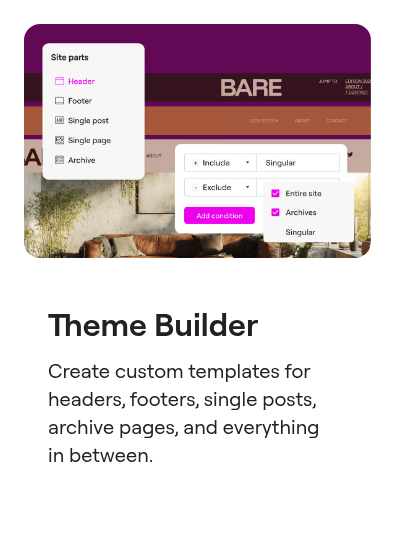
Pro is where the lander either stays simple or picks up the pieces affiliates usually want. The entry paid plan includes Theme Builder, so the offer can share a header and footer with the rest of the site. It also includes a form builder you can connect to marketing tools. The Pro page says form submissions are not available on that plan. The WordPress form inbox is on a higher plan.
Popups and store blocks follow the same plan split. The Pro page marks Popup Builder as not included on the entry plan, and it marks ecommerce features the same way. A page that only needs a layout and a form can stay on the entry plan. A page that needs a popup, a product block, or the form inbox has to step up.
The homepage also advertises AI prompts that draft a full page or a section, then leave every part of the layout for you to edit. Read that as a claim about how a draft starts. A drafted page still has to load for a cold click.
Forms, popups and lead capture are how Elementor describes conversion on the homepage. Only the form builder is on the entry paid plan. Popups require a higher plan. If the offer depends on an exit popup or a WooCommerce block, price the higher single-site plan from the start.
Elementor Pro pricing
Paid plans are annual licences. The entry plan looks finished until the offer needs a popup or a store block. Those sit on the next single-site plan. The annual totals below come from Elementor's 2026 comparison with SeedProd.
Prices (16 Oct 2026)
Essential, one site, $60 a year
Theme Builder and forms. Popup Builder, WooCommerce features and the form inbox start on the next plan.
Advanced Solo, one site, $84 a year
Popup Builder, WooCommerce features, and the form submission dashboard.
Advanced, three sites, $99 a year
The same feature set as Advanced Solo.
Elementor One, $168 a year
Image optimization, accessibility, email deliverability, and 25,000 monthly credits.
Paid plans include a 30-day money-back guarantee. Buy the higher single-site plan when the offer needs a popup or a WooCommerce block. The entry plan is the right spend when the page is a layout and a form you send somewhere else.
Checkout weight, and where the sale happens
Two kinds of offer land on this editor, and they should not share one setup.
If the click goes out to someone else's product, the page only has to win the click or the lead. The free editor covers the layout. The entry paid plan covers Theme Builder and a form. A checkout plugin has no role on that page.
If you sell your own product through WooCommerce, the lander is the first page and the charge happens on the checkout after it. Order bumps and one-click upsells belong to a funnel plugin. CartFlows and FunnelKit both do that job on your store. Add one of them beside Elementor. The bump comes from the funnel plugin, even when this editor draws the page.
Designing that checkout inside Elementor has a measured cost. CartFlows counted 35 HTTP requests on a checkout built with the block editor alone. Adding Elementor raised the total by 20, to 55. The count is in CartFlows' performance write-up. Keep the heavier layout on the campaign page that needs it, and leave the checkout on the lighter build when request count is the worry.
Same-URL testing requires a separate purchase. The Pro plan lists we read do not describe a split test that keeps one ad URL. When the campaign cannot absorb a new destination, move that test to a hosted builder. The split-test guide is the page that sorts those builders.
What buyers report about speed
Public threads split front-end speed from editor speed, and both come up for people building long offer pages.
A lean build can reach a top PageSpeed lab score. One person using Elementor Pro with few extra add-ons wrote:
"I've obtained a score of 100 on pagespeed insights for both mobile and desktop (not that this matters that much) using elementor (with pro elements)." WordPress thread on weight
The same thread treats that result as something you build toward. A reply calls the plugin bloated by design. Hosting, the widget count and the add-ons decide which of those two reports you get. The score belongs to that spare build.
Complaints about the editor show up while you are still revising. One thread says Elementor tends to slow down with long landing pages. Another report said opening a media-heavy page in the editor took four to five minutes. That thread is the one to read if your pages carry a lot of video. The long-page thread is the shorter version of the same worry.
"Elementor tends to slow down with long landing pages" WordPress thread on long pages
Elementor alternatives for landing pages
Stay in the dashboard if the WordPress site is the asset you do not want to move. On the WordPress roundup, SeedProd is the lighter landing-page plugin, and Thrive Architect is the builder that adds on-site tests through Thrive Optimize. Buyers who want a simpler plugin name SeedProd in public threads:
"SeedProd is a solid choice if you want something simple that just works" WordPress thread on SeedProd
SeedProd and Thrive Architect are covered on that WordPress roundup. Their licences and the testing note are there.
Leave WordPress when the ad URL has to stay fixed, or when a plugin stack is more than you want to maintain. Leadpages, Swipe Pages and Systeme.io are hosted builders already reviewed on this site. Read those reviews when the page should live on the builder's servers. The rest of the set is in the review index.
CartFlows and FunnelKit belong next to this editor when the missing piece is the WooCommerce checkout. A lighter plugin, or a hosted page, is the case for a different editor. Compare the WordPress landing page picks when you want the page, the checkout and the test in one place.