Skip to content
Menu

Review

Leadpages review: is it worth it in 2026?

Worth it for lead-gen pages on paid traffic that need uncapped A/B tests. Not the tool for selling your own offer with upsells.

By Marcus Reeve, reviewed by the Lander Report editors. Updated 2026-10-12. How we research

Our verdict

Leadpages is worth it if you send paid traffic to lead-gen pages and want split tests without a visitor cap. Grow, its first testing plan, runs server-side A/B tests and dynamic text replacement, and no plan meters traffic. Skip it if you only publish pages or sell your own offer with upsells: the publishing plans cannot test, and its ecommerce is basic. Heatmaps and Smart Traffic are on the Optimize plan, and the 7-day trial requires a card.

See the Leadpages plans and prices

What Leadpages is in 2026

Leadpages has been a landing page builder since 2012, and it now sells itself as a conversion platform. The product was rebuilt around an AI page builder: you describe the offer, it drafts the page, and you edit it in a drag-and-drop editor. The plans split into two families. Publishing plans (Pro and Business) build and host pages, sites and blogs. Testing and optimization plans (Grow, Optimize, Scale) add A/B tests, dynamic text replacement, lead enrichment and, higher up, heatmaps and AI traffic routing.

Two smaller additions matter to a media buyer. Every plan includes an MCP connector, so you can publish a page from Claude or ChatGPT. And every plan has unlimited traffic, which the vendor sets against the visitor caps on Unbounce and Instapage. Customers on the old Leadpages keep their pages and their price, and can switch between the old and new editor.

How split testing works, and which plan has it

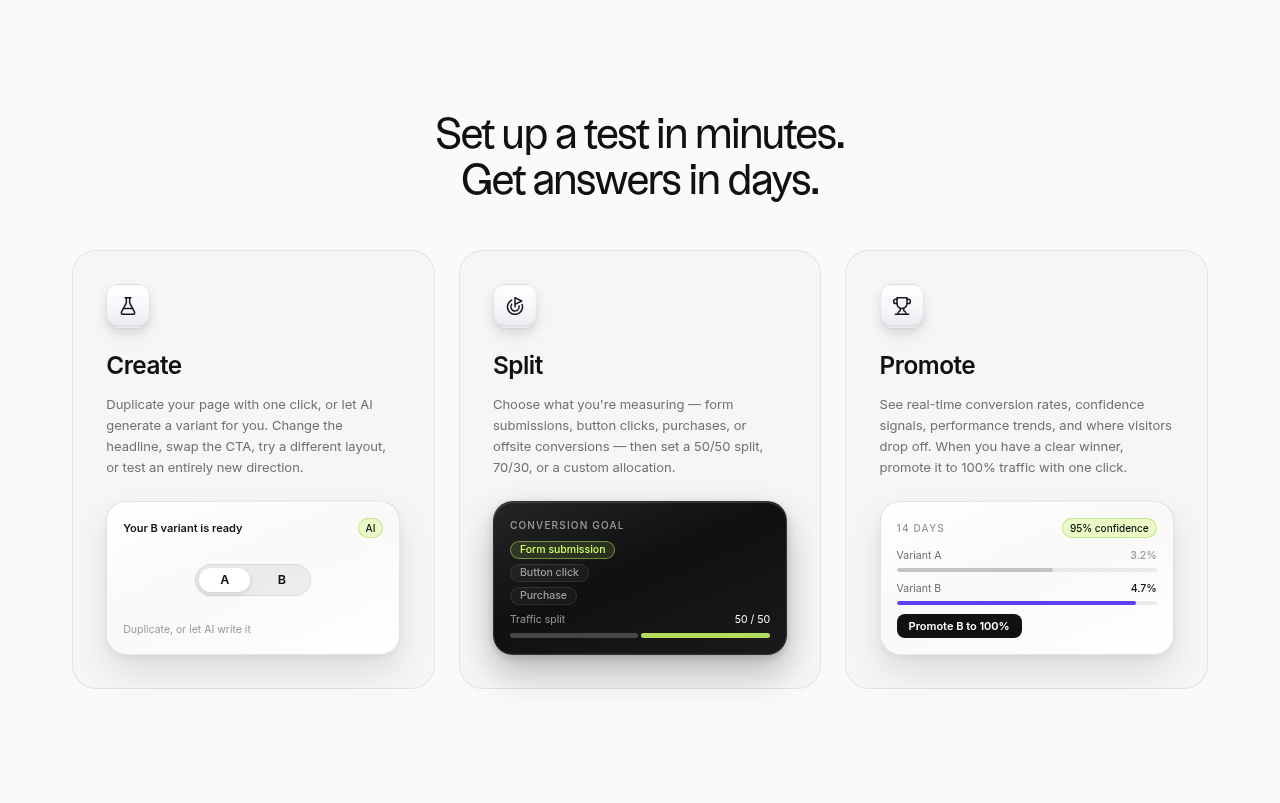
A test takes three steps on the Leadpages A/B testing page. You duplicate the page or let AI write a challenger. You pick the goal (a form submission, a button click, a purchase or an offsite conversion) and the split: 50/50, 70/30 or a custom share. Then you watch the conversion rates and promote the winner to all traffic with one click.

The part that matters for paid traffic is where the variant is chosen. Leadpages assigns it on the server before the page renders. A client-side tool loads the original and then rewrites it with JavaScript, which can flash the control before the variant appears. Results are judged with a two-proportion z-test, Bonferroni-corrected when more than two variants run, and reported in three bands: leaning, likely and clear.

Grow runs manual A/B tests. Optimize adds A/B/C/D tests and Smart Traffic, which sends each visitor to the variant it predicts will convert them. Scale adds a loop that promotes a winner, writes the next challenger and keeps testing. Leadpages says there is no minimum traffic to start a test, but a test still needs enough visitors to call. Our split-test sample size calculator tells you how many days your daily clicks will take, and Evan Miller's note on stopping tests early explains why you fix that number before you start.

Dynamic text replacement for search ads

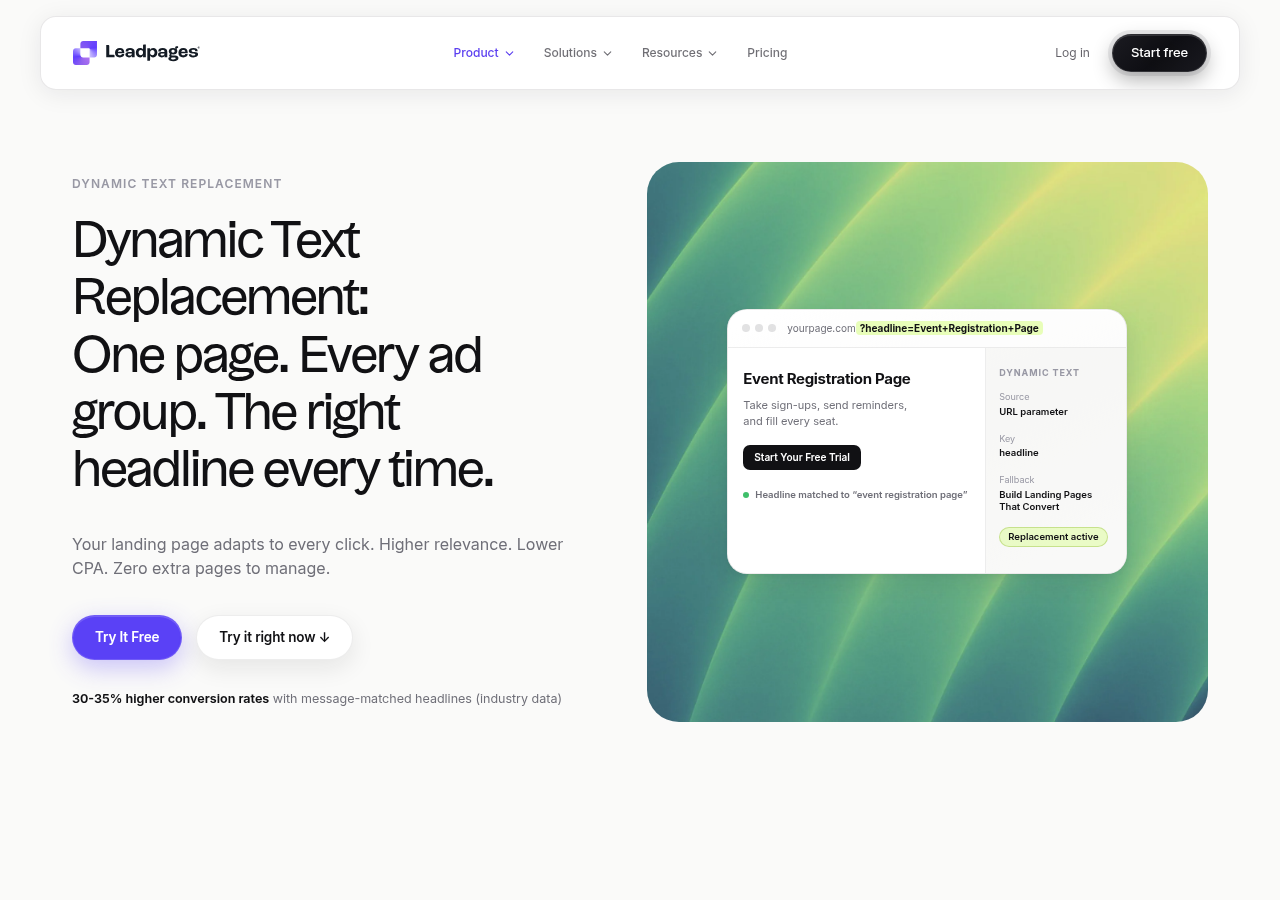
Dynamic text replacement swaps a headline for the value in a URL parameter, with a fallback line when the parameter is missing. Put the keyword in the ad's final URL and one page can greet a dozen ad groups in their own words. Google scores landing page experience and ad relevance as part of Quality Score, so a headline that repeats the search is more than cosmetic. The feature is included in Grow, along with the A/B tests. Manual personalization (a version of the page per audience) comes with Grow too, and auto-personalization with Optimize.

Leadpages pricing, plan by plan

PlanMonthlyYearly, per moWhat it adds
Pro$29$2025 pages, one custom domain, AI editor, no testing
Business$49$3350 pages, two domains, a year of analytics, lead CSV export
Grow$99$67A/B tests, dynamic text replacement, lead enrichment, unlimited pages, four domains
Optimize$199$135Smart Traffic, heatmaps, A/B/C/D tests, three seats, ten integrations
Scale$399Not shownContinuous optimization loop
EnterpriseQuotedQuotedSSO, custom contract, dedicated support

The monthly column is what the Leadpages homepage shows with monthly billing selected. The yearly column is the default view of its pricing page, which advertises 20% off for paying yearly even though the figures it shows work out closer to a third off. The trial runs seven days and takes a card. If you do not pick a plan, the account pauses and the pages stay saved.

Traffic never moves the bill. That is the real difference from Unbounce and Instapage, whose plans count visitors. To see what that is worth at your volume, put your monthly clicks into our landing page builder cost calculator.

Where it falls short

Leadpages is built to capture a lead. It can take a payment, but there are no order bumps or one-click upsell chains, so anyone selling their own offer ends up bolting on a checkout. A busy account will also run into the Grow plan's limits: one team seat, five active integrations, 1,000 lead-enrichment lookups and 2,000 anonymous-visitor detections a month.

Most user complaints are about the account, not the builder. Reviews collected on Hackceleration and in PPC threads describe renewal price jumps, no refund once a charge goes through, and friction when cancelling. The vendor says you can cancel any time from account settings, so set a reminder before the trial's seventh day and before each renewal.

When to pick something else

If you sell your own product with bumps and upsells, read our ClickFunnels review or the Systeme.io review, which put checkout and email in the same account. If the other name on the list is a one-page site, Carrd vs Leadpages is that pair. If you want a cheap page per ad group with fast mobile loads, Swipe Pages is lighter. If you need a client CRM and white-label dashboards, GoHighLevel covers more ground. The Leadpages alternatives page ranks the rest.

My take

I would start on Grow, billed monthly, with one campaign whose traffic you know. Run one headline test to a clear result before you commit to a year. If it holds up and you are still on Leadpages three months later, switch to annual billing and keep the difference. I would skip Optimize until you have enough traffic to feed more than two variants at once, because Smart Traffic and A/B/C/D tests split the same clicks more ways.

Compare the Leadpages and Unbounce testing plans

What works

  • Grow is the first plan with server-side A/B testing. The server picks the variant before the page renders, so visitors do not see the original page flash first, and traffic is not capped or metered.
  • Dynamic text replacement puts the ad keyword into the headline from a URL parameter. One page can then match several ad groups, and the AI builder can draft the version you test it against.

What to watch

  • The Pro and Business plans let you publish pages. Split testing starts on Grow. Smart Traffic, heatmaps and tests with more than two variants are on Optimize.
  • Ecommerce is basic, so selling your own offer with upsells means adding a separate checkout, and the 7-day trial asks for a card up front.
Leadpages' diagram of its server-side test flow (visitor requests the page, the server assigns a variant, the page renders) next to client-side testing, where JavaScript rewrites a page that has already loaded.
Server-side A/B testing. Leadpages' diagram of its server-side test flow (visitor requests the page, the server assigns a variant, the page renders) next to client-side testing, where JavaScript rewrites a page that has already loaded. Screenshot: leadpages.com,
Leadpages' dynamic text replacement page: a sample page whose headline is filled from a ?headline= URL parameter, with the source, key and fallback headline set in a side panel.
Dynamic text replacement. Leadpages' dynamic text replacement page: a sample page whose headline is filled from a ?headline= URL parameter, with the source, key and fallback headline set in a side panel. Screenshot: leadpages.com,
Leadpages' three test steps as interface cards: an AI-made B variant, a conversion goal with a 50/50 traffic split, and a results card with a button to promote the winning variant to all traffic.
A/B test setup and results. Leadpages' three test steps as interface cards: an AI-made B variant, a conversion goal with a 50/50 traffic split, and a results card with a button to promote the winning variant to all traffic. Screenshot: leadpages.com,

What users actually say about Leadpages

Research: unverified

Pages inside WordPress or on a hosted builder

Marketers who want pages to live inside WordPress often pick Thrive's builder stack. Others accept a hosted page tool like Leadpages when the connectors matter more than editing inside WordPress.

“I would use a WordPress plugin like Thrive Architect so you own the content on your site.”

u/KimN997 Reddit: I need multiple landing pages

Billing friction is a ↓ common complaint

Recent solopreneur threads still warn about Leadpages billing surprises and refund limits, separate from page quality.

“poor service, rate raises without notice, and no refunds for accidents”

u/anonymous Reddit: Landing Page: Leadpages vs. Wix?

A long support wait is a ↓ common complaint

Trustpilot reviews from late 2025 and early 2026 describe the chat as a bot, a problem that lasted three weeks, and a ticket with no reply from a person after three working days and two follow-up emails.

“their chat is just a useless bot”

Anonymous Trustpilot: Leadpages reviews on Trustpilot

“I've been trying to solve issues now for 3 weeks with no result.”

Anonymous Trustpilot: Leadpages reviews on Trustpilot

“three working days and two chaser emails later I still haven't heard anything”

Anonymous Trustpilot: Leadpages reviews on Trustpilot

What Leadpages costs

Every plan, with what each one adds, is in the table above. Annual billing lowers the per-month figure, and the full breakdown is on the Leadpages pricing page linked below.

.

Changes to this review

  • 2026-10-12
    Re-read the Leadpages homepage, pricing page and A/B testing page. Rewrote the verdict to answer whether it is worth it, added the full plan table (monthly and annual), the testing workflow, dynamic text replacement and three feature screenshots, and new FAQ answers on pricing and the split-testing plan.
  • 2026-09-27
    First published, after the rebuilt Leadpages moved A/B testing to server-side assignment.

Frequently asked questions

Is Leadpages worth it in 2026?
For a marketer who tests lead-gen pages on paid clicks, yes: Grow gives server-side tests with unmetered traffic. A creator who only needs pages online, or a seller who needs order bumps and upsells, will get more for the money elsewhere.
How much does Leadpages cost?
Billed monthly, publishing starts at $29 and the first plan that can test costs $99. Optimize is $199 and Scale $399, and Enterprise is quoted. Paying yearly brings Grow down to $67 a month on the pricing page's annual view.
Which Leadpages plan includes split testing?
Grow and every plan above it. Grow runs manual A/B tests between a control and a challenger. Optimize adds A/B/C/D tests, Smart Traffic routing and heatmaps, and Scale lets the platform keep generating and testing new challengers.
Does Leadpages have a free trial?
Yes, seven days on whichever plan you pick, with that plan's features switched on. A card is collected at signup and charged on day seven unless you cancel first.
Does Leadpages limit traffic or charge overage?
No plan has a visitor cap or an overage fee. The limits sit elsewhere: page counts on the two publishing plans, custom domains, AI credits, lead-enrichment lookups and active integrations.

Sources

From Leadpages

Other sources

5 discussions and reviews read for this page. Quotes are excerpts; open a link to read the original in context.

  1. [wp1] I need multiple landing pages Reddit,
  2. [wp2] Landing Page: Leadpages vs. Wix? Reddit,
  3. [tp-bot-2025-10] Leadpages reviews on Trustpilot Trustpilot,
  4. [tp-weeks-2025-10] Leadpages reviews on Trustpilot Trustpilot,
  5. [tp-ticket-2026-02] Leadpages reviews on Trustpilot Trustpilot,

Keep reading

Marcus Reeve

Written by

Marcus Reeve

Editor

Marcus leads the rankings at Lander Report. He reads the long threads where media buyers argue about which builder survives a Meta review and which one resets their ad learning, works through the vendors' own docs and pricing pages, and verifies every price before it goes into a table. He writes the roundups and the head-to-heads, and he cares most about one question: does a test cost you your campaign's learning phase?

marcus.reeve@landerreport.com

Last checked 2026-10-12

Comments

No comments yet. Questions and your own experience are welcome.

Leave a comment

Thank you. Your comment will appear once it has been reviewed.