Will you regret buying ThriveCart?
You saw a lifetime-deal ad, or a colleague weighed this cart against ClickFunnels and SamCart, and you want to know if the product is real. The second question is whether the bill will annoy you six months from now.
It is a real hosted checkout for products you sell yourself. The homepage puts one order bump on the lower plan and one-click upsells beside it. Unhappy buyers in public threads are usually missing affiliate tools on their plan, waiting on a refund of the software subscription, or reporting downtime that stopped a customer from paying. Someone who needs pages, email and a course on the same invoice should open the ClickFunnels review. ClickFunnels is the wider suite. ThriveCart is the payment step.
See the ThriveCart plan table. Use it to compare the monthly trial with the lifetime licence, and to see which plan includes affiliates.
What you are paying for
ThriveCart hosts the checkout for you. A buyer lands on a form, can add one bump on that same step, and can be offered a one-click upsell or downsell after paying. Standard allows one bump. Pro+ allows more than one. Standard includes unlimited products and funnels. What changes on Pro+ is the bump limit and access to the affiliate center.
Abandon-cart recovery is on that Standard list too. You can follow up on an abandoned checkout from inside the platform. A/B split testing is listed with those checkout features. The homepage and the pricing post describe tests on the checkout or the funnel. They do not describe variants that share one web address an ad can keep. If the ad must keep one URL while you change the page, host that page on a landing page tool. The Leadpages review and the Unbounce review cover that page. The payment step can still be this cart.
Custom branding, a custom domain, subscription dunning and automated affiliate payouts are the Pro+ additions, along with the extra bumps. One bump is enough for a single add-on beside the main offer. A second bump, or a partner you pay a commission, means you need Pro+.
ThriveCart pricing
The monthly pricing post is where both billing styles are written down. The month-to-month amounts also appear as future payments on the Standard checkout and the Pro+ checkout. The lifetime licence is the preferred option on the Standard account checkout. The homepage states 0% fees on sales.
| Plan |
Billing |
Price |
Included |
| Standard |
Monthly |
$47 |
1 bump, upsells, downsells, cart recovery, split test, unlimited products |
| Standard |
Annual |
$37/mo |
The Standard list, billed for the year |
| Pro+ |
Monthly |
$87 |
Affiliates, extra bumps, dunning, custom domain and branding |
| Pro+ |
Annual |
$67/mo |
The Pro+ list, billed for the year |
| Standard |
Once |
$495 |
Lifetime licence |
Read the first two rows as Standard. Monthly is what that checkout charges after the trial if you skip annual billing. The annual row is the lower price from the pricing post, billed once for the year. Pro+ has the same monthly and annual choice. The last row is the lifetime licence.
Divide the lifetime price by the monthly Standard price and the result is a little under eleven months. That calculation uses only those two prices. It leaves out card fees, any later move to Pro+, and how long you actually keep the account.
Only the monthly plans include the trial, and the checkout asks for a card first. The homepage lists support as 24/7 beside that fee.
ThriveCart lifetime deal
The lifetime licence is still on sale. The pricing post says that option remains next to the monthly plans, and the Standard account checkout presents the single payment as the preferred option.
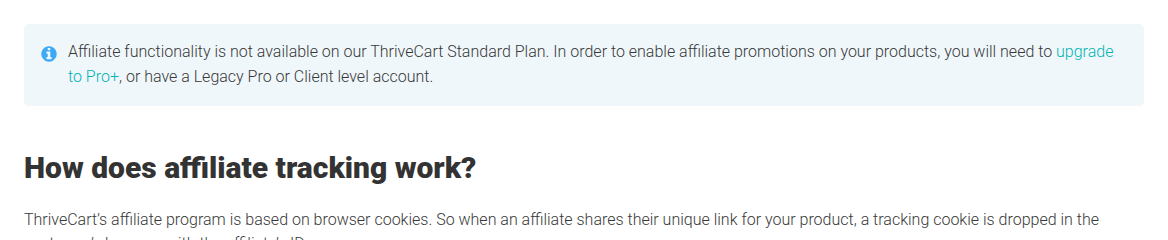
Choose the lifetime licence if you expect to keep Standard past those eleven months and you will not run affiliates. Choose a monthly plan when you want the trial first. Affiliate tools sit on a higher plan. The helpdesk walkthrough says affiliate functionality is not available on the Standard plan. A new account needs Pro+. The same note also names a Legacy Pro or Client level account as one that already has the center.
The Pro+ price in the table is what a new monthly subscription costs. Choose it if you are signing up now and you already need affiliates, more than one bump, or dunning.
Who should pay, and who should pass
Pay when you sell your own digital products and you want the bump and the one-click upsell on a checkout someone else hosts. Standard fits when one bump is enough and nobody is promoting the offer for a commission. Pro+ fits on the day you add that commission program, a second bump, or dunning on a subscription.
Skip Standard if an affiliate program is why you are looking at ThriveCart. That helpdesk article says a new Standard account cannot run affiliates. The upgrade it names is Pro+.
A shop that already runs on WooCommerce, and wants the form inside that shop, should read the CartFlows review. A plugin on your store is a different install from this hosted form. The FunnelKit review is the other WooCommerce option in the set.
Paid traffic that needs every variant on the same ad URL is a page problem. The Leadpages review and the Unbounce review are the ones for that page. Keep ThriveCart when the bump and the upsell are what you came for.
ThriveCart alternatives
Move to ClickFunnels if checkout is only one part of the subscription you want. People compare that suite with ThriveCart because it also includes pages, email and courses. The ClickFunnels review lays out what that subscription covers past the payment form.
WooCommerce is the self-hosted route. The form lives in the store you already run, which matters when the catalog is there and you want one place for the order. CartFlows is the first of those reviews. FunnelKit is the second, for a store comparing plugins rather than hosted carts.
High order volume costs more, and Checkout Champ sells that platform through a sales call. The Checkout Champ review covers the checkout, the upsells and the gateway routing. Open it when volume is why you are comparing carts.
Course businesses often want the lessons and the payment form on one subscription. The Kartra review is the creator bundle. The Kajabi review is the one to open when the course and the membership site are the business.
Sometimes the checkout is settled and the landing page is still the open question. Leadpages publishes that page while this checkout can remain the payment step. Unbounce is the review to open when the experiment on the page is why you are looking. The ThriveCart alternatives page gathers those eight. Rates are on the ThriveCart pricing page.
SamCart is the other hosted cart in the buyer threads. The outage comment and the comment about Stripe both come from a comparison with SamCart. That thread is the one to read if SamCart is the cart you were about to buy.
The rest of the set is on the review index. When the page matters as much as the payment step, the landing page builder roundup is the wider list.
What buyers keep saying
Public comments disagree, and both sides are useful. One digital marketing thread has a buyer angry about a software refund, and a seller who keeps coming back after trying other platforms. Capterra has a reviewer who watched a customer refund post a second time, and a later page where the complaint is the sales page builder and a coupon field clients struggle to find.
The SamCart thread is where uptime comes up, and where someone says they stayed because of how Stripe treats the account. Read the refund complaints next to the sellers who stayed. A lifetime ad mentions neither.
The sales page builder is a fair reason to keep the selling page in another tool and use ThriveCart for the form. Buyers who cannot see the coupon box still have a checkout problem.
See the ThriveCart plan table and match the plan to affiliates and bumps before you put a card on the trial.