Your ads already point at one lander. You want a second headline without calling a developer, and you have heard that Framer now runs the test inside the product. It does. The test ships as Convert, an add-on that bills on events, and Framer only counts a conversion on the day of the visit.
A form or a button that converts during that visit can live on this canvas. A checkout, an upsell path, a hoplink, or a lead who returns the next morning belongs on a builder made for that job.
See Framer pricing
What Framer is on a paid campaign
Framer is a visual canvas with hosting, forms, a CMS and analytics on the same site. Framer's landing-page solution lists the campaigns it is built for: product launches, waitlists, events, paid campaigns, lead generation and signups. The page is aimed at campaigns that capture a form submission, or send the visitor on to another page.
That is a site you design and host. The product pages describe the page, the form and the test. A media buyer sending cold traffic to a vendor's order form still needs that vendor's checkout, or another tool that hosts the sale. The Framer page is the front door.
Put it on the same shortlist as the Unbounce review and the Leadpages review when the argument is about landers. Open the full review list when the page also has to charge a card. These reviews are built from vendor pages and public threads, which is what the verdict above is based on. The method page explains how these reviews are put together.
Forms are part of the product. CMS collections sit beside the campaign pages, two on Basic and ten on Pro, so a marketing site can keep the lander and the rest of the site in one project. Staging and branching arrive on Pro. That is the plan where a second person can review a page before it goes live.
For an affiliate, the limit shows up when the button has to report the click back to a network. A bridge can look finished and still leave that click unrecorded. The product pages used here do not describe postbacks. Count the click in the ad platform, or in the network, and treat Framer's event total as a page-view meter.
People also talk about how fast a page can be designed here. That page describes a visual canvas for those campaign pages, with forms and hosting included when you publish. A team that already designs on a canvas will get the page up faster here than with a builder that starts from a form. The next sections cover the test window, the bandwidth allowance, and checkout living on another system.
Framer pricing for marketers
The pricing page lists Free, Basic, Pro and Enterprise, plus Convert as an add-on. Monthly list prices are in the table. Enterprise is the other plan the add-on can attach to. The dollar amounts in the table are the ones on that pricing page.
A custom domain starts on Basic. The free plan publishes on a Framer domain. Staging, branching and site redirects start on Pro. Convert attaches to Pro or Enterprise, so a real test starts at Pro plus the add-on, before the first paid click.
Monthly list prices from Framer's pricing page. Convert is an add-on.| Plan | Bandwidth | Includes | Price |
|---|
| Free | 1 GB | Framer domain | $0 |
| Basic | 50 GB | Domain, 30 pages | $10/mo |
| Pro | 100 GB | Staging, 150 pages | $30/mo |
| Convert | 500k events | 5 tests, on Pro | $50 |
| Extra editor | Seat | One more seat | $20/mo |
| Extra bandwidth | 100 GB | Up to 2 TB | $40 |
An event, on that same pricing page, is a page view, a click on a tracked link, or a submission through a tracked form. Buying clicks buys events on every visit, including the visits that never submit. An extra editor is its own seat line. A freelancer and a client in the same file are two seats. Past the Pro allowance, bandwidth scales in blocks up to a 2 TB maximum. Both rates are in the table.
Framer A/B testing: how a test runs
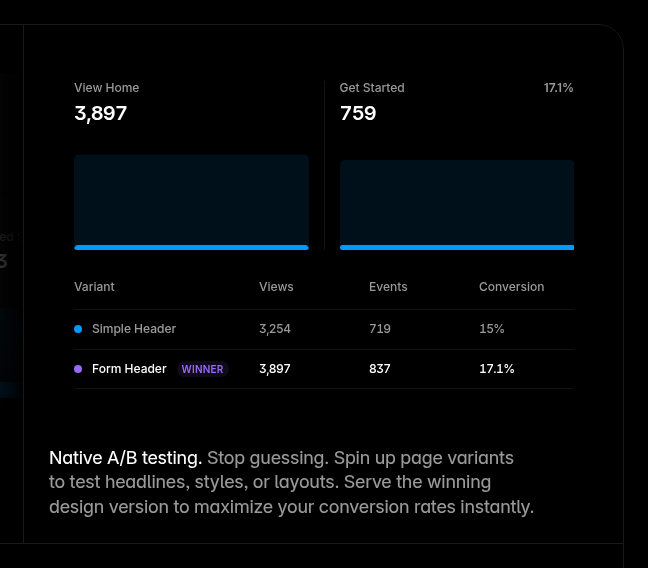
The help article on A/B tests allows up to five variants on a page. After the test starts, Framer splits visitors evenly across those variants. A conversion can be a link click, a form submission, or a page visit, and the variants share tracking IDs so the same action is counted on each version.
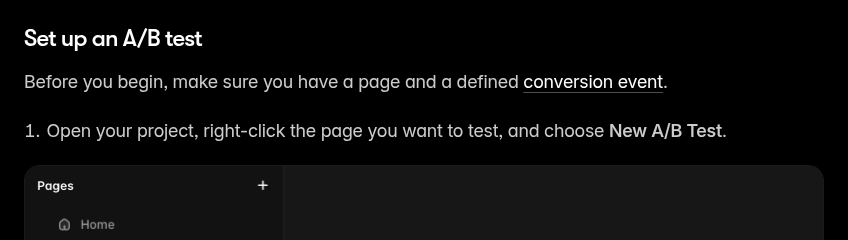
You open the project, start the test on the page, and publish. The article's first step is a right-click on the page, then New A/B Test. Traffic then splits on its own. You read the result against a Bayesian score Framer calls Probability of Being Best. A variant is the winner once that score passes 90 percent and the page has enough visits. The split-test sample size calculator turns a baseline conversion rate into a visitor count and a number of days, which is the figure to set beside that 90 percent mark.
Tests run without cookies. Framer builds an anonymous identifier from the visitor's IP address and browser info, and the identifier resets daily. Framer states that a conversion is measured only inside that day. Someone who reads the page at night and submits the form after breakfast is outside the window. A funnel with a long gap between the click and the form will miss the variant that actually won.
The article describes that cookieless assignment. A server that chooses the variant before the HTML is sent, under one fixed address in the ad, is the mechanism in split-testing a lander without resetting ad learning. Whether an ad platform treats the daily reset as stable enough for its review rules is not settled in Framer's help article.
Convert includes those tests, plus funnels and automated triggers. A trigger can open an overlay, or switch the variant a visitor sees, based on rules you set. That path still lives on the Framer site. When money changes hands, it changes hands on the system that charges the card.
Five tests can run at once. A media buyer with a dozen angles in one week will hit that cap and have to end a test before starting another. The help article also caps each test at five variants, with an even split, so a 90/10 holdout is outside what this tool describes.
The analytics page presents the built-in stats as cookieless and GDPR-compliant, with UTM and referrer breakdowns. That is Framer's own compliance line for the product.
Bandwidth and events when the ads are on
Pro's monthly bandwidth is the allowance in the table. On a site full of images and video, one poster in an r/framer thread on bandwidth wrote: "I burned through the 100GB bandwidth limit in about a week with roughly 300 visitors per day." A short form page weighs less. That thread is the only public report of how fast the allowance ran out.
Events are a second meter. On the pricing page, an event is a page view, a click on a tracked link, or a form that was tracked. A campaign that buys traffic raises both meters: bandwidth from the files on the page, events from the visits themselves. The landing page builder cost calculator lets you compare Unbounce's visitor caps with a monthly click volume. Framer's comparable lines are the bandwidth block and the event block in the table above.
Who should use Framer for landers
I would keep Framer for a SaaS page, a waitlist, a lead form, or an agency brand campaign where the slow part is the design. The canvas, the hosting and the forms are the reason to open it. The conversion has to finish during the visit, as a form submission or a click.
I would move the campaign when the click has to reach a vendor checkout through a bridge, when the path needs upsells, or when the test has to follow a buyer into the next session. Leadpages puts the ad keyword into the headline from a URL parameter, which is how one page can match several ad groups. The Instapage review covers accounts that personalize the page to the ad at a larger scale. The Swipe Pages review covers phone traffic where the page has to paint quickly.
An offer that needs a second visit before anyone submits fights the daily reset. A webinar signup or a waitlist that converts during the visit fits the window. Match that window to the offer before you add Convert.
Framer vs Unbounce on the bill
Framer's comparison with Unbounce lists Unbounce Experiment at $112 a month billed annually, set against the Pro row. Convert is left off that comparison. On this site, the Unbounce review records Experiment at $149 a month, or $112 a month when the year is paid up front, with a cap of 30,000 visitors. That is the first Unbounce tier with classic A/B tests.
Read the Pro row and the Convert row together before you treat the lower figure as the test price. A Google Ads buyer, in a thread on landing page builders for ads, wrote: "Unbounce is still the best option in most cases, but I reach for Framer when I need speed and design flexibility on smaller projects." I read that as a split in the work. The default ad lander stays with the specialist. I would open Framer when the project is small and the design has to move fast.
The cheap landing page builder guide is the band under $50 a month. Pro sits in that band. The test stack, Pro plus Convert, sits above it.
What buyers report
On speed, a PPC buyer writing about client pages in an r/PPC thread on A/B tests wrote: "Framer makes it stupid easy to spin up landing page A/B tests without a developer." That praise matches a design team shipping a visual test the same afternoon.
On depth, a Framer user in a thread about paying for A/B testing wrote: "Framer's built-in add-on is decent for quick copy/visual tests but limited if you want multiple variants or deeper funnel tracking." Five variants is the ceiling in the help article, and the daily reset is the funnel limit. The add-on fits a quick test of copy or layout.
See Framer pricing